● Products

One record, wherever you work.

The same data, the same tables and the same provenance in the app, the terminal, Python, Excel and the API. None of them computes a number on its own. Each shows what the engine computed, with the filing, the period, the version and the moment it became known one click away.

01The app

One application, a space for each desk.

The app opens on a command line. Type a company, a pipeline or a question and it shows what the input resolves to before you press Enter. Work is laid out in tabs of linked panels that share one context: the company, and the date you are viewing the market as of. Pin a tab to a past date and every panel in it shows only what was public then. Any number in any panel opens its source.
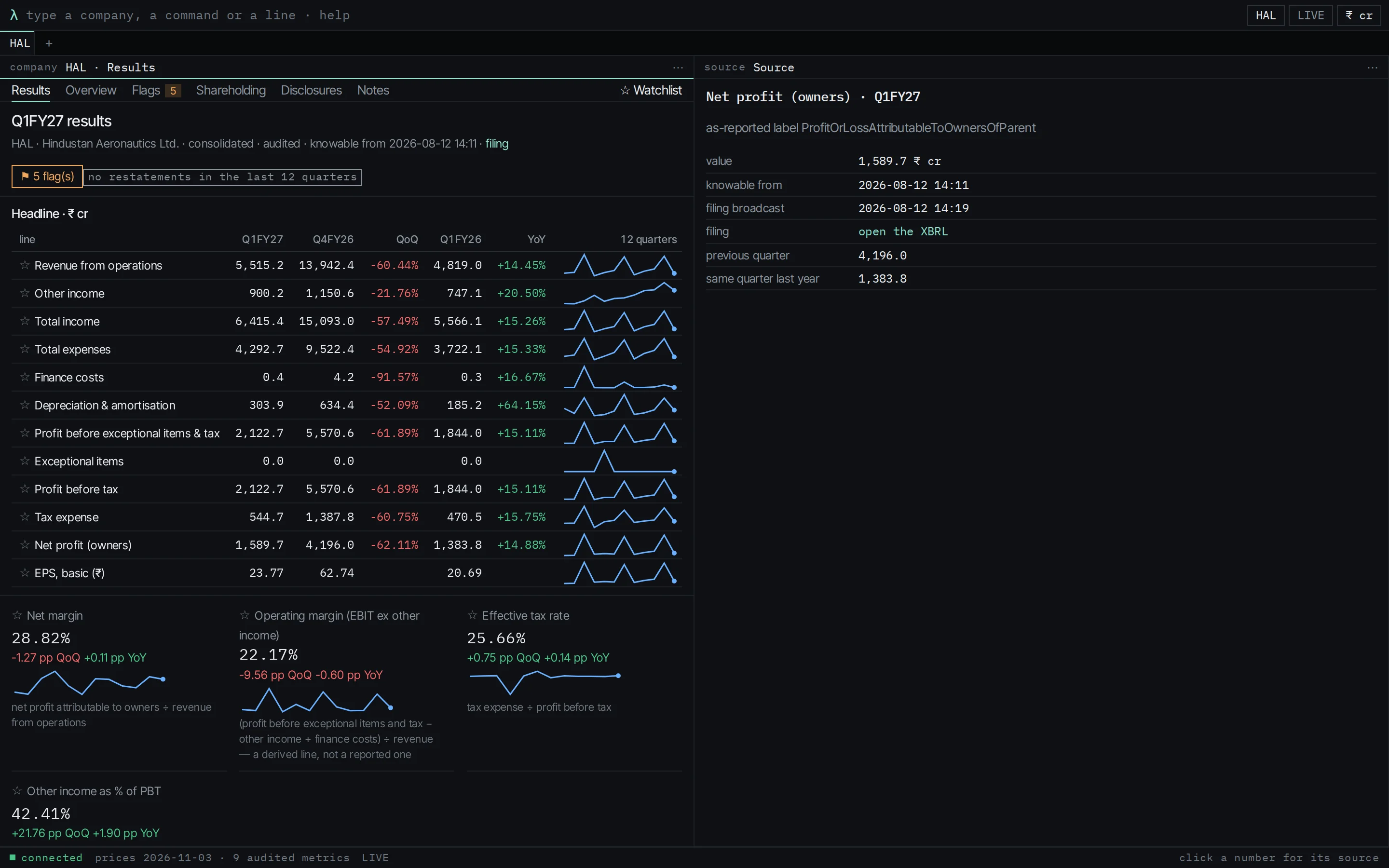
The Lamda app on Hindustan Aeronautics' Q1 FY27 results: headline lines against the previous quarter and the same quarter last year with twelve-quarter sparklines, and a source panel for net profit showing the value, the minute it became knowable, the filing broadcast time and a link to the XBRL filing
HAL's Q1 FY27 results on the Desk. Clicking net profit opens its source: knowable from 14:11 on 12 August 2026, broadcast at 14:19, and the filing itself.
desk fundamental

One company, read closely

  • Results against the previous quarter, the same quarter last year and a twelve-quarter strip
  • Restatements shown, not hidden: revised filings, and quarters that changed without one
  • Flags when a number doesn't fit: identities that fail, margins outside the company's own range, auditor changes, rising pledges
  • Shareholding and promoter pledge over time, dated by when each filing was disclosed
  • Disclosures with governance tags, linked to the original attachments
  • Watchlists, a results feed, tracked metrics and notes stamped with the date they were written as of
tables quant

Build, check and serve tables

  • Everything the terminal does, in panels: screener, line-item browser and data catalog
  • The pipeline language from the command line, with completion
  • Drill any cell to every version of it and the second each became known
  • An Explain view of every implicit choice the engine made
  • Versions: seal a table, refresh it, roll it back or restore any earlier version
  • Custom flags you build in a form compile to a pipeline line a quant can open and edit
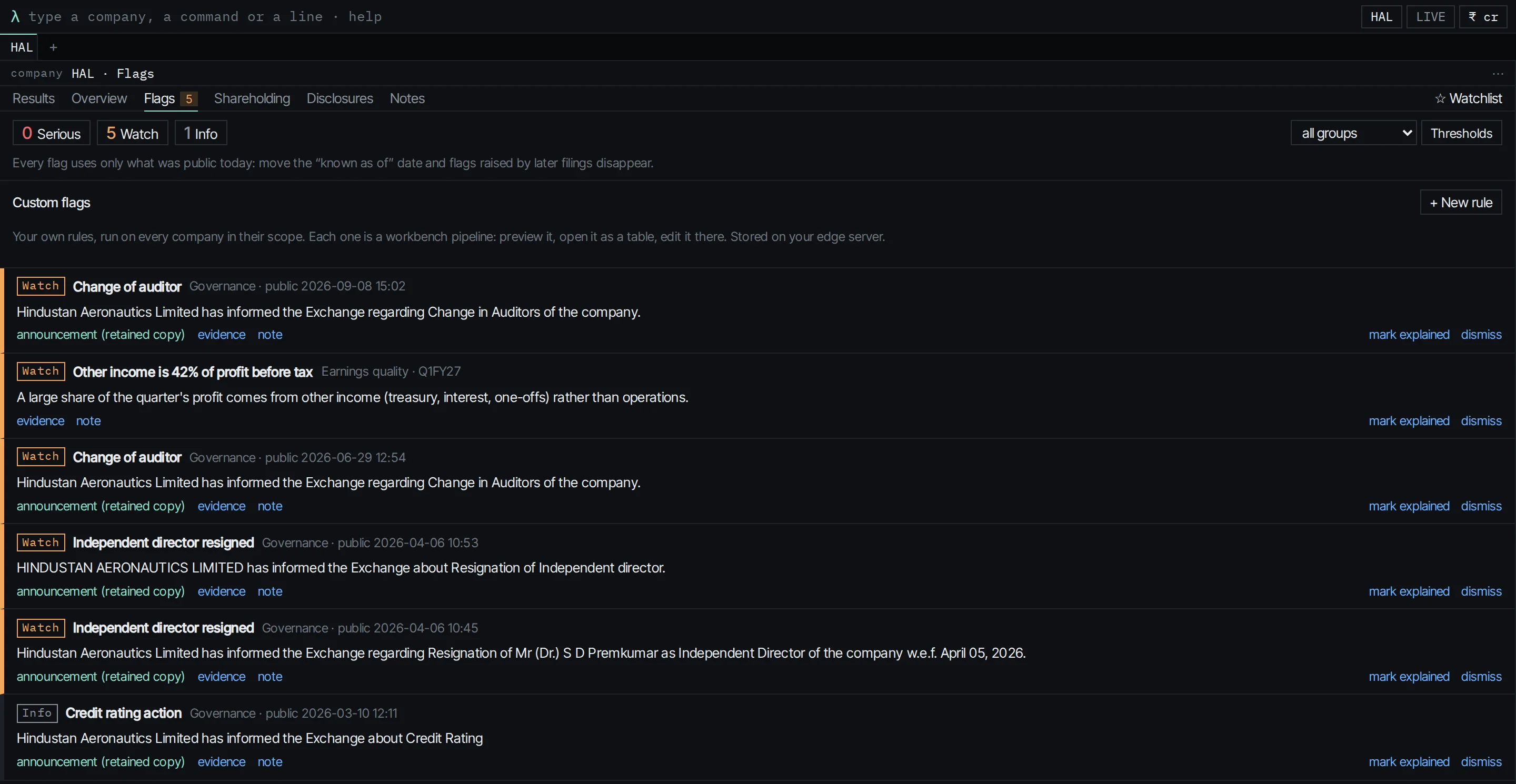
The Flags tab for Hindustan Aeronautics: five watch flags and one info flag, including two changes of auditor, other income at 42% of profit before tax, two independent director resignations and a credit rating action, each with its public timestamp, the announcement, evidence and buttons to mark it explained or dismiss it
Flags on HAL. Each one says what tripped, when it became public and where the evidence is, and can be marked explained or dismissed with a note.
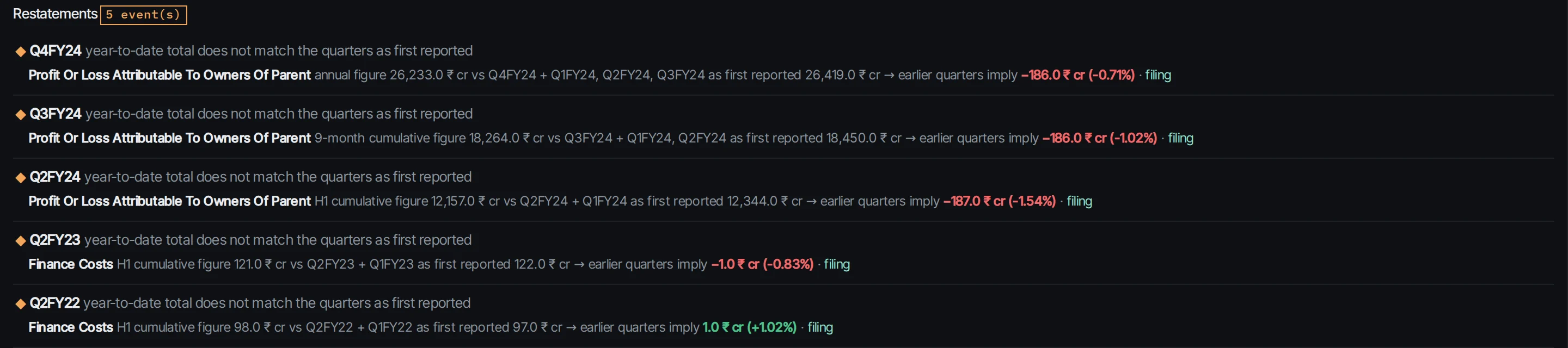
Infosys restatements: in four periods the year-to-date figure for profit attributable to owners or finance costs does not equal the sum of the quarters as first reported, with the difference in crore and percent and a link to each filing
Restatements on Infosys, caught without a revised filing: the year-to-date totals don't add up to the quarters as first reported, by up to ₹187 cr.
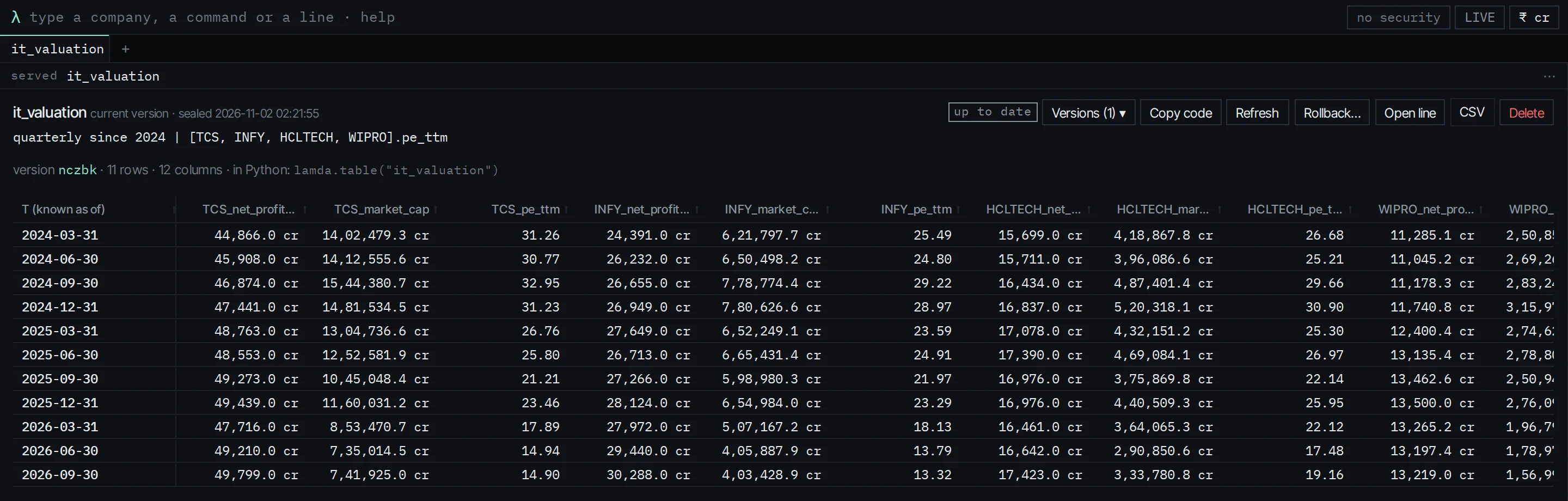
A sealed table named it_valuation in the Tables space: the line that built it, version code nczbk, eleven quarterly rows of net profit, market cap and P/E for TCS, Infosys, HCLTech and Wipro, and buttons for versions, refresh, rollback, CSV and delete
A sealed table in Tables: the line that built it, its version code, and the call that opens it in Python.
02The terminal

The fastest way in, from any machine with a shell.

A keyboard-driven terminal UI with the full pipeline language, catalog and completion. It runs on your desk or over SSH from a laptop. Write a line, drill into a cell, add columns in plain English with | ask, seal the result under a name and open it anywhere else on this page.

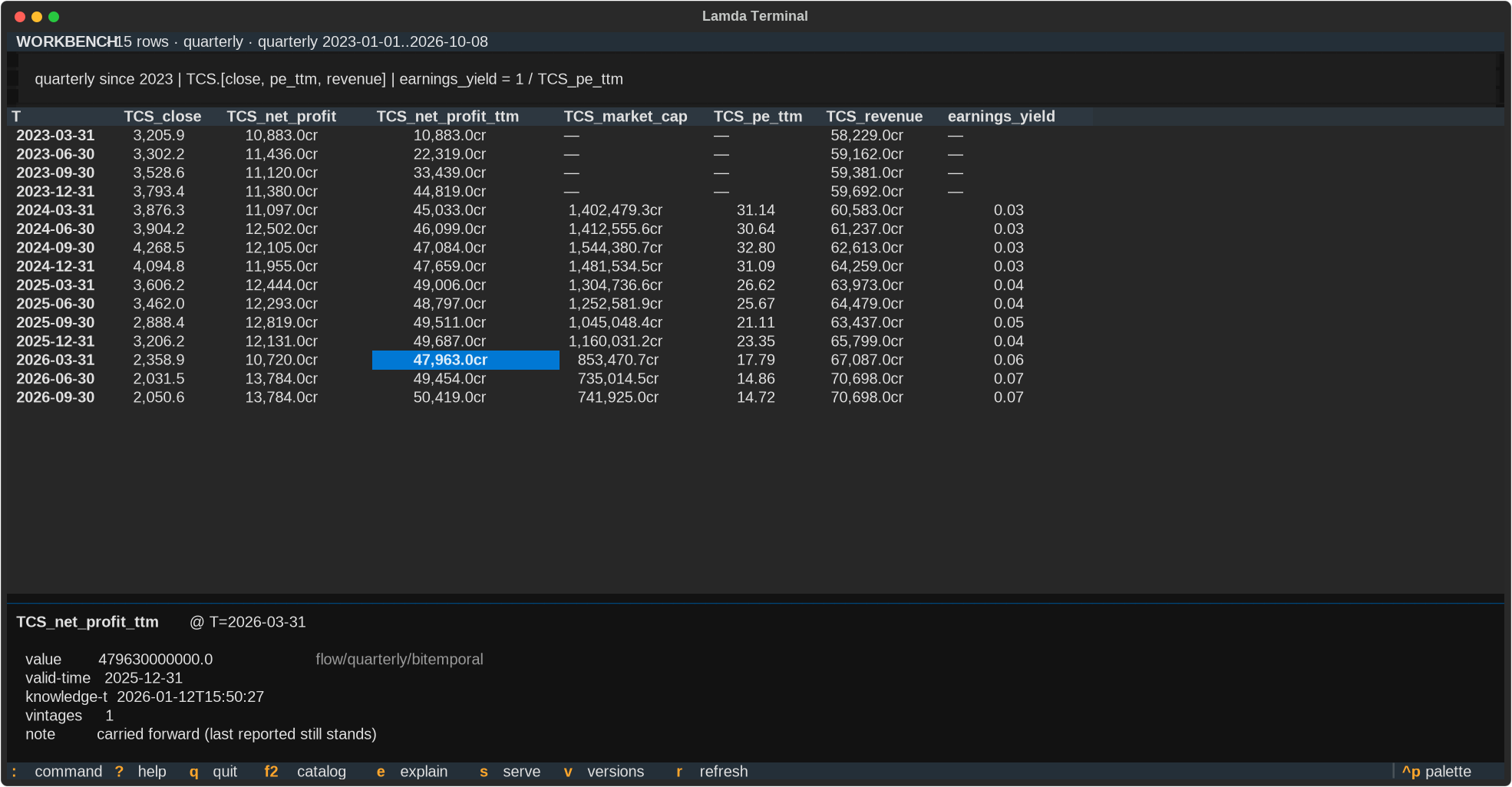
The Lamda Terminal workbench: a quarterly TCS table of close, revenue, TTM revenue, TTM net profit, market cap and P/E since 2024, with the selected TTM cell's provenance open below
The terminal on real TCS filings. One line builds the table; the panel shows the selected TTM's four quarters and the second the latest one became public.
03Python SDK

A sealed table in one call.

import lamda, then ask for a table by name and get a Polars DataFrame. Every time a table is sealed it becomes a version with a short code, and any version can be pulled exactly as it was, however the table has changed since. Knowledge times come with the values when you ask for them. Nothing is overwritten.

python

import lamda

lamda.table("it_valuation")                           # the latest version, as a Polars DataFrame
lamda.table("it_valuation", "nczbk")                  # one exact version, by its code
lamda.table("it_valuation", kt=True)                  # + when each value became public

lamda.versions("it_valuation")                        # every version, newest first
lamda.run("quarterly since 2024 | HDFCBANK.pe_ttm")   # run a line without saving it

lamda.serve("it_valuation", line)                     # seal a new version
lamda.refresh("it_valuation")                         # re-run against the latest data
lamda.rollback("it_valuation", 2)                     # keep the first 2 stages, replay
lamda.restore("nczbk")                                # make that version current again

shell

lamda tables
lamda table it_valuation --kt
lamda versions it_valuation
lamda table it_valuation --csv out.csv
lamda restore nczbk

A refusal from the engine reaches Python in the engine's own words, as lamda.Refusal, so a pipeline that would give a silently wrong number fails loudly in a notebook too.

04Excel

Your model, your layout, filled from the record.

Most funds live in their own Excel models, and those models have their own labels, order, subtotals and forecast columns. Lamda doesn't change the layout. It fills it.

add-in in testing

Lamda inside your own model

  • =LAMDA.VALUE(period, metric) pointing at your own header and label cells
  • Map your labels once to your own definitions, then fill a whole sheet
  • New results arrive as a new column, inserted. Your forecast columns are never touched
  • Inspect any cell: the filing, the quote, every version and the alternatives
  • Pin a sheet to a knowledge date, or freeze it with provenance for the file
workbooks built

Sealed tables, straight into a workbook

  • Export any sealed table to a workbook with its values, knowledge times, columns, the line that built it, its version history and its provenance
  • A Power Query script that refreshes a sheet from a sealed table
  • Worksheet functions through xlwings to pull, refresh or roll back a table from a cell
05The API

Everything on this page is a client of one API.

The app, the terminal, the SDK and the add-in all read the same HTTP API, and none of them has data or arithmetic of its own. Your own code and your own agents can use it the same way, with the same tables, the same refusals and the same context on every number: the period it covers, whether it is audited, which version it is and when it became known.

http

# a sealed table, as CSV
curl $LAMDA_API_URL/workbench/versions/it_valuation/csv

# run a line: the same line the terminal and the app take
curl $LAMDA_API_URL/workbench/run -H 'content-type: application/json' \
  -d '{"line": "quarterly since 2025 | [TCS, INFY, HCLTECH, WIPRO].pe_ttm"}'

See it on your own desk.

Get in touch →